

Build Engineering and Dependency Management Challenges for Melba
Building a modern game engine like Melba from scratch is a multi-year systems engineering effort. It’s much more than just a renderer: it’s a runtime where graphics, animation, physics, audio, networking, tools, asset pipelines, and platform layers must work together within strict latency and memory limits - across multiple platforms - while staying maintainable and debuggable. The surrounding ecosystem matters too: authoring workflows, content pipelines, profiling, and build systems, because iteration speed is part of the product. Making Machine Learning Inference a first-class part of the engine increases complexity dramatically.
This post is about two specific build engineering areas: dependency management and build performance.
Author: Pavlo Karabilo, Senior Devops Engineer
Melba uses a few third-party dependencies - some (like Dear ImGui) are visible to anyone following our engineering posts. In large C++ projects, dependency management is rarely straightforward because a “dependency” isn’t just code you include and link. It also includes assumptions about:
compiler version and language mode
standard library / binary interface compatibility
Debug vs Release behavior, runtime linkage, symbol visibility
compile definitions that change behavior
platform toolchains and developer kits
It’s easy to reach a state where everything compiles and links but still fails at runtime - runtime library mismatches on Windows, One Definition Rule violations, or “works in my development environment” differences caused by feature probing and environment-dependent configuration. Having stable reproducible builds that are delivered within minutes after engine source code is changed is one of our highest priorities for the Tech team.
Preamble
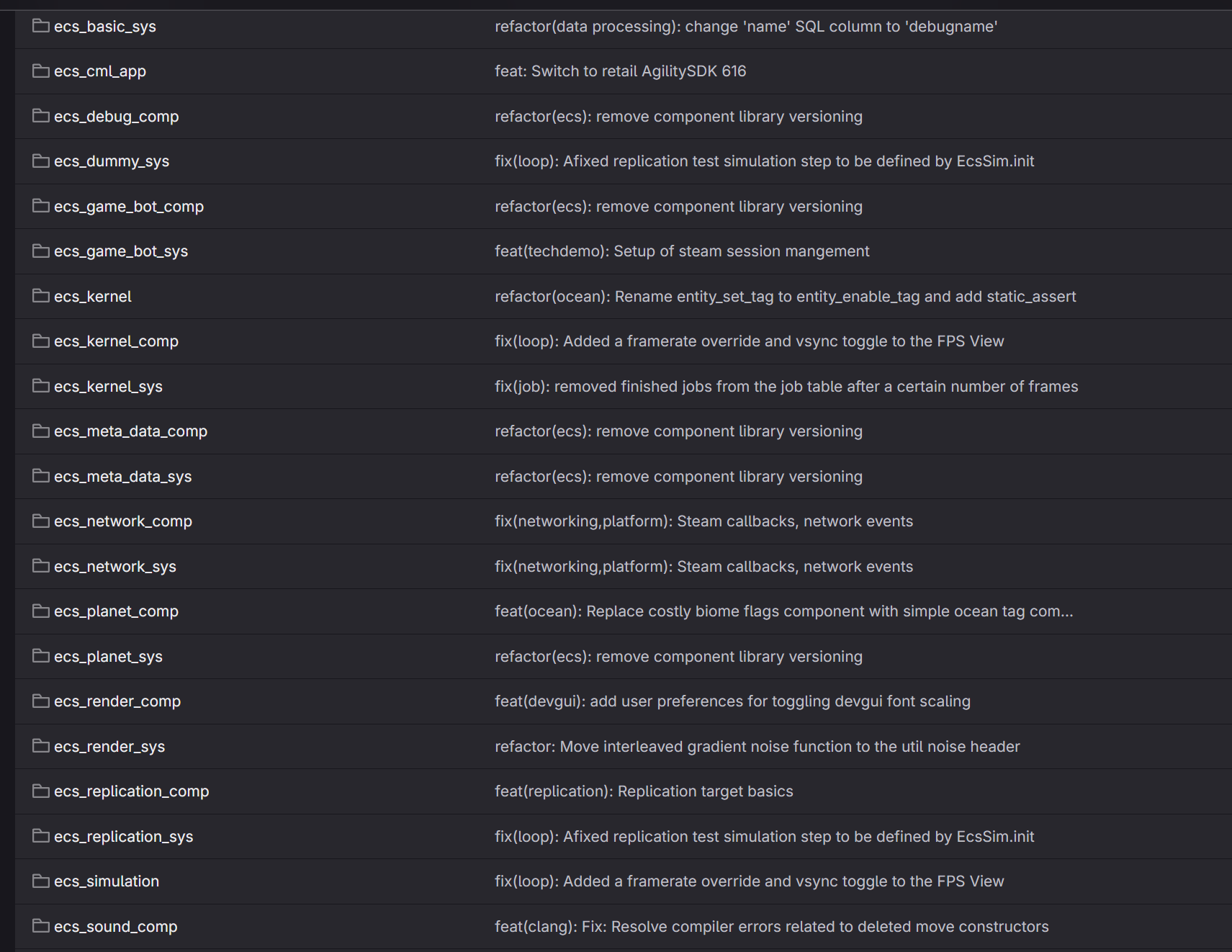
A couple of months ago, our Tech team set an ambitious goal of re-organizing the structure of the Melba engine, which also meant “throw away and re-implement our whole build setup and pipelines from scratch”. The reason for that was simple: Melba is built on an Entity Component System (ECS) paradigm, and pretty much every new feature added to the engine had a new “sys” and “comp” folder added to our repository. This clearly didn’t scale well:

We had all our third-party dependencies in a folder called “libraries” and most of them were added as a pre-built binaries at some point. Example below is a pre-built libcurl with dynamic libraries in bin subdirectory, header files in include/curl and .lib files in lib:


One of the “sub-goals” of the Melba re-structuring initiative was to reconsider this approach of checking binaries into the repository. Obviously, precompiling third-party dependencies that are not supposed to be changed often is a good build optimization step - we didn’t have to re-compile every library from scratch on each build. But apart from optimization it introduces certain longer-term issues. Firstly, binary compatibility in C++ is configuration-sensitive. Prebuilt artifacts are tied to the exact toolchain and flags used to build them: compiler version, standard library, runtime linkage, debug vs release runtime, linker optimization settings, exception flags, sanitizer instrumentation, and sometimes CPU features. Some parts of this setup can be moving, which usually only adds to general confusion (e.g. why did one precompiled library survive updating 3 major versions of the Windows Development Kit, but started causing issues with a minor linker flag change?). As soon as you support multiple platforms and multiple build modes, “a binary dependency” becomes a matrix of binary variants. Miss (or mess up) one and you may (or may not) get linking problems or, worse, runtime issues that are difficult to diagnose. Try to move from one compiler toolchain to another (as we also did during Melba reorganization adding LLVM/Clang next to Microsoft C/C++ Compiler) and build and runtime issues are guaranteed.
Precompiled libraries also makes debugging and instrumentation harder. When a dependency causes a crash, memory corruption, or performance regression, you often want to rebuild it with symbols, sanitizers, or tracing. Or perhaps having it re-built with different configuration or a source code patch. With prebuilt binaries, you either accept black-box behavior or maintain separate build pipelines for those artifacts anyway. In practice, many teams end up rebuilding from source for investigation—and then the prebuilt approach becomes an additional maintenance burden rather than a simplification.
For ML-heavy systems, binaries can be especially brittle. ML dependencies frequently vary based on GPU backend, driver/runtime versions, math libraries, and CPU feature sets. You either ship many variants (large repo footprint and distribution overhead) or constrain the set of supported configurations (which can slow iteration and limit performance tuning). For many projects, the sustainable middle ground is: pinned source revisions, strict option control, aggressive caching, and trace-driven profiling—so builds are both reproducible and debuggable.
And finally, whenever a newer version of 3rd party library is published, trying to upgrade the one we have is often a day-long task, even with automation scripting in place. There is usually a bunch of new hidden undocumented flags, parameters, features, etc, that are very often tailored for the most common use case, and this common use case can be even a different OS than our primary target.
Of course, there are a lot of 3rd-party tools that are developed to fix all of these issues. Tools like vcpkg, conan and a couple dozen of others are out there for a reason. Unfortunately, C++ doesn’t have any standard tooling for build engineering and dependency management. So whatever can be solved in other languages with go get or pip install takes a lot more effort with C++.
So, in order to tackle the dependency management task for Melba, we decided to try out something a bit different. As the most attentive reader might have noticed, we are using CMake as a part of our engine build system. CMake, being as tricky to work with as it is, has become a de-facto standard in the world of C++ for converting human-readable and manageable code into bloated XML (or other format) that actual build tools like MSBuild or Ninja expect. So, we’ve decided to try out one lightweight library which fits into the CMake environment pretty much natively - CPM.cmake. The advantages of this library are straightforward - it is a single drop-in cmake file, which exposes a few useful functions - those can be used to download any library from github.com (or any place on the internet) and add it pretty seamlessly into our project. It doesn’t matter much if that dependency has CMake setup with it or not, e.g. Lua example with a few extra lines of CMake code. The disadvantage of it is that with more dependencies added, it is guaranteed that both the CMake configure and build steps will grow in time. And this is exactly the issue we’ve observed when we replaced our pre-built libraries with CMake code such as:
cpmaddpackage(
  GITHUB_REPOSITORY zlib-ng/minizip-ng
  GIT_TAG 4.0.10
  SYSTEM YES
  OPTIONS
  "MZ_INSTALL OFF"
  "MZ_FETCH_LIBS OFF"
  "BUILD_SHARED_LIBS ON"
)
After looking at our Continuous Integration pipeline build times, we’ve noticed that the build times grew quite significantly. In the older pipelines, a generate+build step of the Release configuration would take approximately 1.5-2 minutes:


while in newer pipelines - up to 3 minutes:


Of course, it is possible to say that 3 minutes is still a good result in the world of game engine building. But this build time increase is still quite noticeable for us in our day-to-day workflow. Obviously, our first natural instinct would be “we picked a wrong tool, we should ditch CPM or even CMake altogether and go back to what we had before”. At the same time trying out new versions of dependencies with CPM was so much easier than with our previous approach. It was the amount of those waiting minutes that caused frustration, not the tooling and benefits that CPM was bringing to the table.
So we started by profiling the CMake generate and build steps using standard tooling. It is worth mentioning that we already had other optimizations in place such as pre-compiled headers and CPM’s CPM_SOURCE_CACHE flag pointing to a location next to Melba’s repo, so that all third party dependencies were downloaded only once per machine. We should also mention that it is possible to just reduce the build time by reducing the amount of cases where CMake regenerates the solution, just generate once and then build multiple times on the same CMake cache. In our case, unfortunately, CMake changes were too frequent during Melba restructuring and even afterwards. Also, the CMake workflow in Visual Studio IDE has a tricky bug (which is still not fixed at the time of writing this article) - the IDE would always regenerate the CMake cache on every switch of the build configuration preset.
The first thing we’ve observed from our new pipeline build logs was increased output during the CMake generation step whenever any CMake file would change:

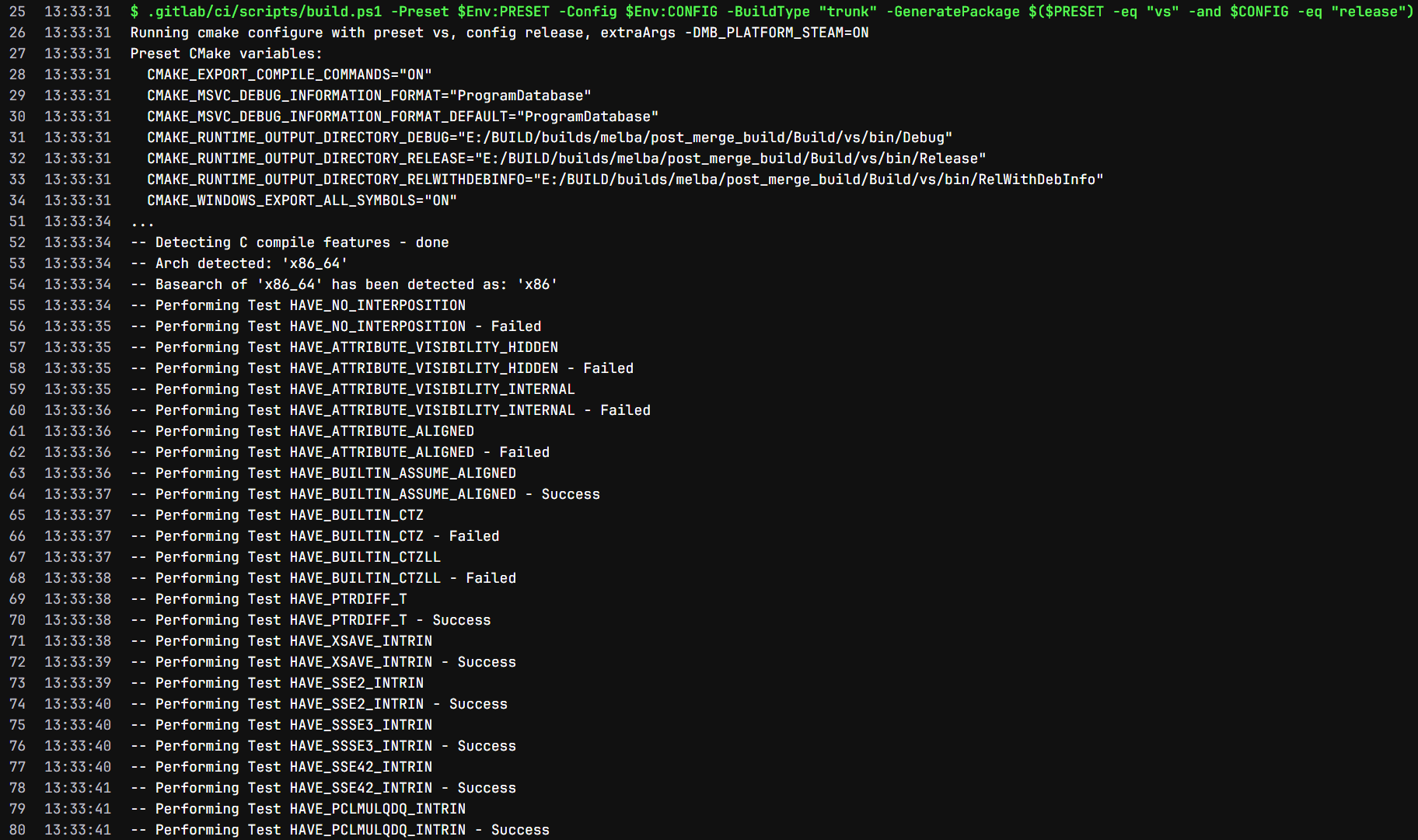
A lot of these logs would span over multiple pages and even with CI timestamps it would be hard to visualize how much time those “Performing Test” operations would cost. But it was clear that those were repetitive operations that were just returning the same results every time they ran. In order to get a better overview of the CMake’s generation timeline, we can run the following command:
cmake --profiling-output=prof.trace --profiling-format=google-trace --preset clang
This generates a file which can be opened in freely available tools such as Perfetto:


So it is indeed obvious that the “configure” step with all the cpmaddpackage calls takes more than 80% of the CMake regenerate operation. Zooming into a single cpmaddpackage call and clicking through the flame graph would then reveal what kind of functions are called from which CMake modules:


And basically every time we try to generate a VS solution or Ninja (or any other) build file with CMake , it would try to compile a small specific C program to check whether the compiler has some language feature supported. It is fairly easy to lock support for those features early and pass specific flags under the OPTIONS parameter of cpmaddpackage calls in CMake - those values will need to be reviewed only when a new compiler version is tried out or when we’re adding a new target platform to our build. There are not only language feature support checks, but also checks for the availability of header files, symbols, installed packages and some other things that can be considered mostly static in a build system. After trying to eliminate every check like this that can be hardcoded, the cpmaddpackage call for installing minizip-ng library would look like this for us:
cpmaddpackage(
  GITHUB_REPOSITORY zlib-ng/minizip-ng
  GIT_TAG 4.0.10
  SYSTEM YES
  OPTIONS
  "MZ_INSTALL OFF"
  "MZ_FETCH_LIBS OFF"
  "BUILD_SHARED_LIBS ON"
  "MZ_BUILD_TESTS OFF"
  "MZ_BUILD_UNIT_TESTS OFF"
  "MZ_COMPAT ENABLE"
  "HAVE_STDINT_H ON"
  "HAVE_INTTYPES_H ON"
  "HAVE_STDDEF_H ON"
  "HAVE_SYS_TYPES_H ON"
  "HAVE_OFF64_T OFF"
  "HAVE_FSEEKO OFF"
  "MZ_BZIP2 OFF"
  "MZ_LZMA OFF"
  "MZ_ZSTD OFF"
  "HAVE_BCRYPT ON"
)
Apart from several HAVE_* options, there is also a number of flags that are better documented and can be looked up in library documentation. Different libraries would have different levels of quality of documentation, as well as a different amount of OPTIONS that we would have to provide to have an efficient configuration and build, e.g. SDL would require around 60 option flags passed to it. Even though it looks bulky in a CMake file, it has a subtle advantage of having configuration of 3rd-party library builds always documented and version controlled. So we can e.g. pinpoint a 30-second increase in average build time to the commit where someone enabled LZMA in a data compression library.
One more useful feature of Perfetto UI is SQL querying. For example, we can use a query that looks like this:
SELECT
  name,
  COUNT(*) AS calls,
  ROUND(SUM(dur) / 1e6, 2) AS total_ms,
  ROUND(AVG(dur) / 1e6, 2) AS avg_ms,
  ROUND(MAX(dur) / 1e6, 2) AS max_ms
FROM slice
WHERE dur > 0
GROUP BY name
ORDER BY SUM(dur) DESC
LIMIT 50;
to see which function calls take up the most time overall:


Here we can see that after more high-level functions like add_subdirectory and cpmaddpackage, try_compile is at 5th place with 28 seconds in 87 calls. Perfetto has a decent documentation on its SQL syntax which helped us a lot during the optimization process.
OK, but how can we profile and optimize the build step after CMake configuration and generation is done? For that we can use the following set of tools and commands:
cmake --preset clang -DCMAKE_CXX_FLAGS=-ftime-trace
cmake --build --preset clang-release --parallel
# Ninjatracing tool from https://github.com/nico/ninjatracing
python.exe ninjatracing -e .\Build\.ninja_log > trace.jsonTrying to navigate the result in Perfetto UI is possible, but much more complicated, especially for a parallel build:

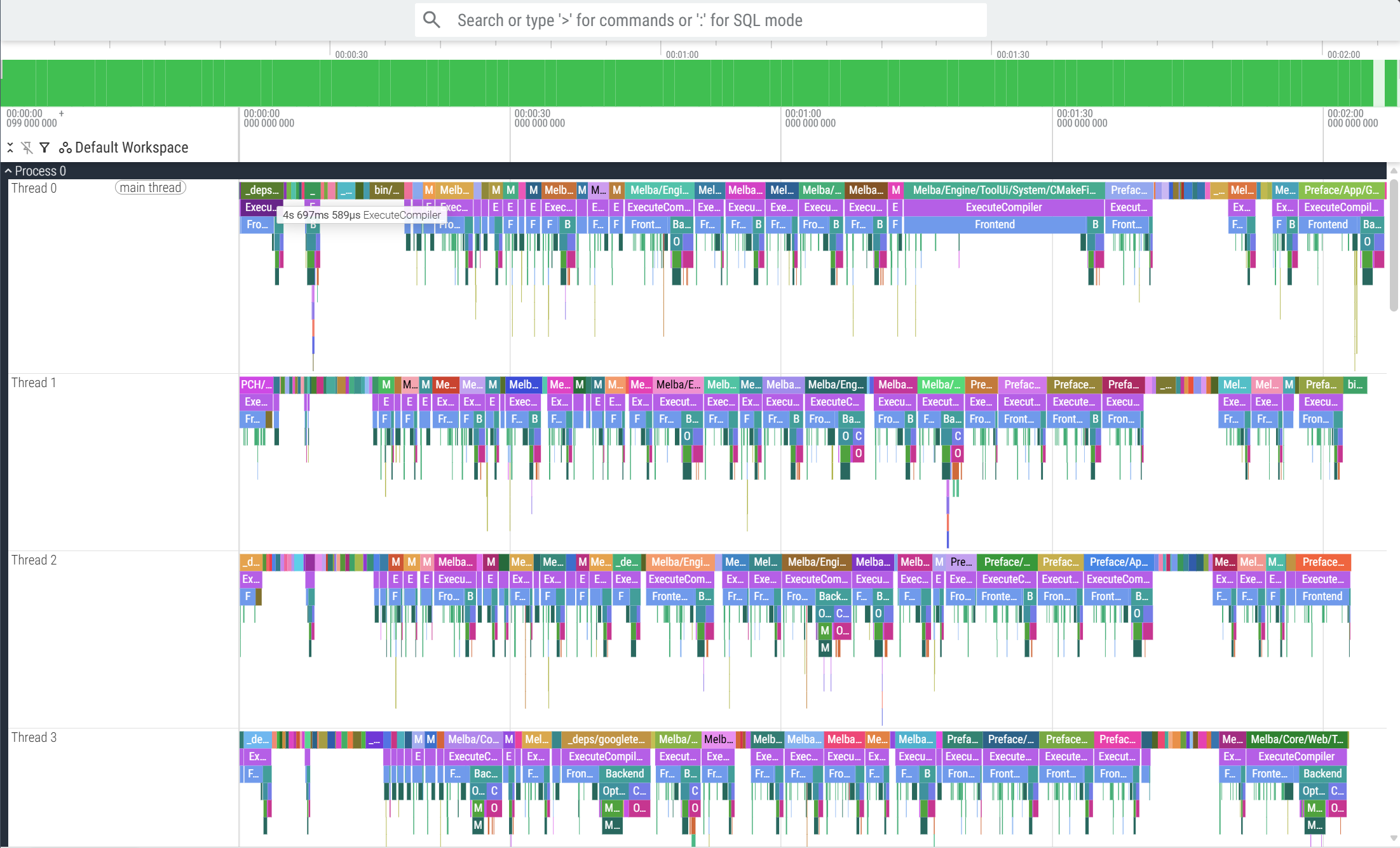
In this case, a simple SQL query works great for finding parts of 3rd-party libraries that add up most to the build time and try to optimize those:
SELECT
  name,
  COUNT(*) AS calls,
  ROUND(SUM(dur)/1e6, 2) AS total_ms
FROM slice
WHERE name GLOB '*_deps*'
GROUP BY name
ORDER BY SUM(dur) DESC;

In the screenshot above we can see that tiny_gltf.cc file takes more than 16 seconds to compile, and it can be easily fixed by setting a couple of extra options for this header-only library in CMake (those options are documented in library’s README, but we’re all humans and miss out some things sometimes). A couple extra options will remove this file from the build:
cpmaddpackage(
  GITHUB_REPOSITORY syoyo/tinygltf
  GIT_TAG v2.9.6
  SYSTEM YES
  OPTIONS
  "TINYGLTF_BUILD_LOADER_EXAMPLE OFF"
  "TINYGLTF_INSTALL OFF"
  "TINYGLTF_INSTALL_VENDOR OFF"
  "TINYGLTF_HEADER_ONLY ON"
)
Conclusion:
After going through the part of our CMake files which handle third party libraries (and making its line count grow from 300 to 500), we’ve managed to reach this result for our build pipelines:


So, we’ve managed to reach our initial build times by measuring and optimizing specific code around our 3rd party dependencies, and on top of that we’ve also added a bit more flexibility with source code of dependencies being available for debugging and potential patching when needed.
Of course, there is still room for improvement here and we always want to achieve build times that are blazing fast for developers in local workflow, as well as for CI/CD pipelines. CPM.cmake suggests using ccache but this tool does not list Windows and Visual Studio as primary supported operating system and IDE. Tools like conan2 seem promising, especially with possibility of hosting own conan2 binaries server with JFrog Artifactory or even Gitlab which we already use. So keep an eye on our technical blog - there might be part 2 of this article coming out soon!